MIT InstructMesh and Photoshop Relight: Language-Driven 3D Mesh Editing vs. Generative Lighting for Creators
MIT’s InstructMesh edits TRELLIS meshes in language, then you print. Photoshop Beta 27.10 Relight adds up to three generative lights. Neither is a prompt gallery.
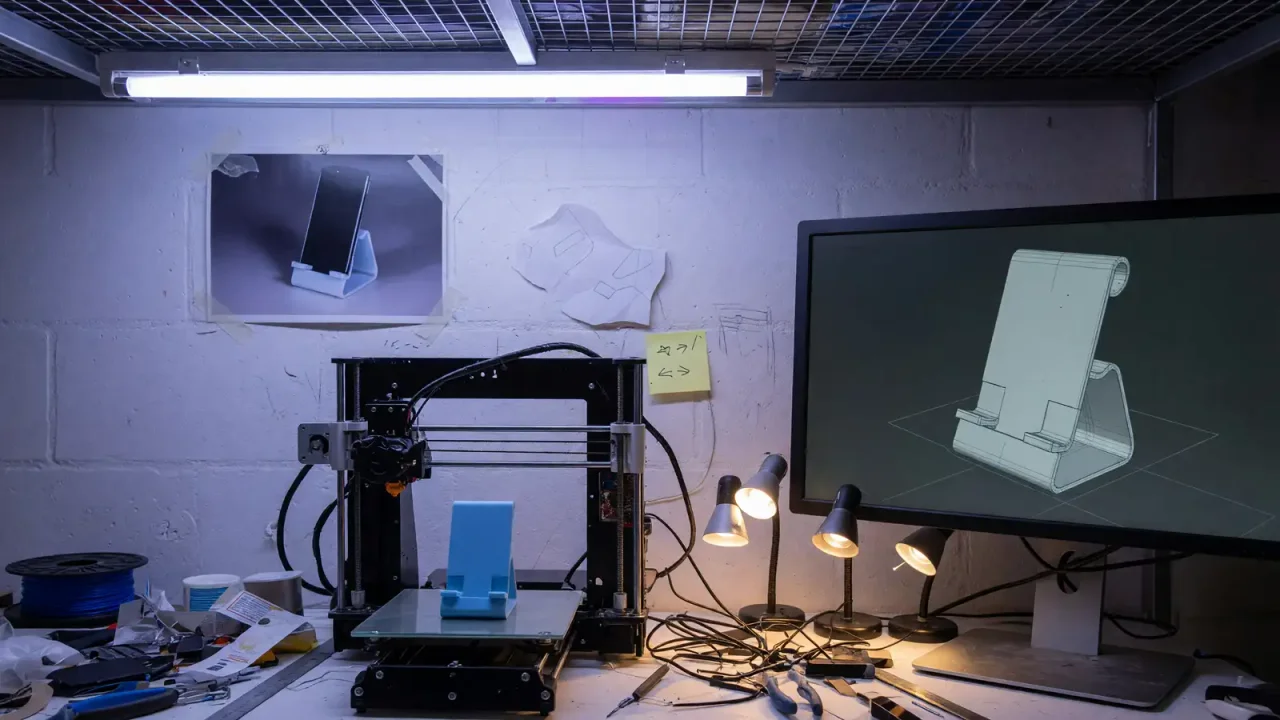
MIT News on October 1 described InstructMesh as software that generates a 3D object, lets you point at the broken bit in language, and then aims you at a printer. Creative Bloq a day earlier described Photoshop’s Relight as a Beta layer that rips the lighting out of a photo and hangs up to three new lamps on it. One pipeline ends in plastic. The other ends in a Relight Layer. Both are this week’s argument that “generate” is the cheap verb and “repair” is the product.
We already treated Firefly as a store and Nano Banana as a SKU and Images 2.5 as an edit history. This week is meshes and lamps. If your art stack is still a prompt and a shrug, you are buying the demo.
TRELLIS makes the blob. GPT-4 argues with it
InstructMesh is MIT CSAIL with Google and Northeastern. The stack MIT named is Microsoft TRELLIS for 3D from text and images, plus GPT-4 for the language side. Faraz Faruqi, SM ’22, PhD ’26 from EECS and a recent CSAIL affiliate, is lead author. His quote in the MIT piece is the design brief: put 3D generators and LLM reasoning in one interactive space so people get objects they actually want.
The demo object in the copy is a pair of glasses. You prompt a design, highlight the parts that are wrong, refine, then print. Users in the write-up made things that resembled phone stands and vases. They used sliders to enlarge or extrude a region when language was too sloppy. Manipulation happens in the generator’s latent space. You describe the issue in natural language. The system proposes geometry. You approve or you do not.
That last clause is the whole product. A gallery image you cannot edit is a poster. A mesh you can refuse is a tool. Faruqi says the point is scaffolding work that used to require 3D-software fluency. We believe the user quotes enough to try a phone stand. We do not believe them enough to skip checking wall thickness before PLA hits the bed.
Household items, accessories, robots that work in the real world: MIT’s list. “Work” is doing a lot. A vase that prints is not a robot. A glasses frame that clips your temple is not a success even if the prompt was cute. InstructMesh is being sold as fabrication, not as a render. Hold it to fabrication. If the pipeline does not export something your slicer will take, you have another chat window.
TRELLIS is the visual prior. GPT-4 is the complaint department. Anyone who has used a language model to “fix” an image knows the model will cheerfully agree you wanted a wider arm while destroying the hinge. The MIT flow inserts a highlight-and-approve step so that agreement is not auto-commit. That is closer to PhotoDirector’s local tools than to a fire-and-forget feed.
We do not have MIT’s user-study N, success rate, or print-failure rate in the published report. We will not invent a percentage. What we have is qualitative: people said they got what they prompted and could tweak with sliders. That is a usability paragraph. It is not a manufacturing spec. If you need a bracket that holds a 2 kg monitor, this paper is not your FEA.
Relight is three lamps. The pixels underneath stay
Creative Bloq’s September 30 piece names the Photoshop feature Relight. Desktop Beta. Version 27.10.0, build string 202600802.m.3625. Layer menu, New Relight layer. A default white light lands in the center. You drag it around, including off-canvas. Intensity, color, diffusion. Up to three artificial lights, each togglable. All off and you are looking at leftover ambient or original light. A Relight Layer shows up in the Layers panel. Original pixels stay.
The mechanism Bloq describes is not a gentle dodge-and-burn. Relight removes the existing lighting and generates new lighting. That is why the comments split. Some September 29 posts called it insane for speed, a way to understand light direction even if you still paint. Bloq’s own frame compares the argument to Nvidia DLSS 5: a reconstruction people will either treat as a cheat or as a default.
If you shoot on a job that promised practicals, Relight is a compositing decision, not a filter. Clients who paid for a gaffer may not want a Beta lamp. Clients who paid for a single overhead in a basement will love three fill lights that do not exist. Neither reaction is a moral. Both are contract language. Put Relight in the SOP or keep it off the deliverable.
Non-destructive is the sentence to keep. A layer you can mute is different from a flattened “generative fill” stamp. You can still do the honest work on a duplicate. You can also lie to yourself that the layer is temporary and then send the JPEG. Process is a habit. The feature will not save you from the habit.
Three lights is a cap. Real sets are greedier. Relight is not a replacement for HDRI work in a 3D scene. It is a still-image relight. InstructMesh is the 3D scene. Do not mash them into one “AI art” tweet. One of them wants a printer. One of them wants a Layer Comp.
Beta build numbers move. If you cannot find New Relight layer, you are not on 27.10.0. That is a version problem, not a skill issue. Bloq wrote a how-to because Twitter was already posting results. Results without a version pin are how studios “lose” a feature on Monday.
Repair is the art-direction job this week
Prompt-to-mesh tools have been demoing “a chair” for years. Chairs that do not sit are still the genre. InstructMesh’s claim is that you can say “the arm is too thin” and get a different arm without opening Blender. Relight’s claim is that you can say, with a drag, “the key is on the left now.” Both are editorial interfaces on top of a generator. The art is in which edits you accept.
That is closer to last month’s visual bible vs weekly model fight than it looks. Consistency was the film problem. Repair is the object problem. A bible that cannot be patched is a PDF. A mesh that cannot be patched is a render dump.
If you illustrate for fabrication, InstructMesh is the story to test. Phone stand, vase, glasses. Start with something that fails safely. Do not start with a drone frame. Export. Slice. See whether the approved latent edit survived as a manifold. If it did not, you learned more than the MIT lede.
If you retouch stills, Relight is the story to test on junk files. A product shot with one hard window. Add a light. Mute it. Check the shadows on type. Generative lamps hallucinate contact. Your eye still owns the contact. Bloq said some artists will use it as a base and paint. That is the grown-up path.
MIT Technology Review also ran an October 1 note on reconstructing viewed images from brain scans. I am leaving it in the week as a reminder that “image generator” now includes pipelines you did not type. It is not InstructMesh. It is not Relight. Do not file it under Photoshop. File it under consent.
How you actually click it this week
MIT’s path, as written: prompt a design, highlight the failure, describe the failure in language, watch the latent edit, approve, print. The glasses example is the shape. Phone stands and vases are what users reportedly made. Sliders exist for enlarge and extrude when the sentence is too soft. If your first session is “make me a chair in the style of X,” you skipped the product. Start with “the left arm is 4 mm thinner than the right” on an object you already generated.
We do not have a public web app URL in the MIT News article. Academic tools sometimes ship as a paper, a GitHub, and a lab demo. Until you have a build, you cannot put InstructMesh on a production desk. You can put the workflow on the desk: generate, localize the defect, require an approve, then export to a slicer. If a vendor sells you “InstructMesh-like” without the approve, you bought autocomplete.
Relight’s click path is in Creative Bloq. Update Photoshop to Beta 27.10.0, build 202600802.m.3625. Open the still. Layer menu, New Relight layer. White light in the center. Drag. Add up to two more, cap of three. Mute them independently. Look at the Relight Layer in the panel. Confirm the background pixels did not get replaced. If they did, you are not on the feature Bloq described.
The social clips from September 29 are speed tests, not color-managed proofs. Use Relight on a copy. Keep a Layer Comp with lights off. If you deliver to print, check the blacks where a generated fill light lifted a wall. Generated light loves to wash contact shadows. Your gaffer would not.
Do not run Relight and InstructMesh in the same breath as a “3D from a photo” party trick. Relight is 2D lighting on a photograph. InstructMesh is a mesh aimed at fabrication. A phone stand that only exists as a relit JPEG is not fabricated. A relit product shot that you then “mesh” without a scan is not a dimension.
What to put in the studio notes
Write the stack names down. TRELLIS plus GPT-4 plus a human approve step equals InstructMesh as MIT described it. Photoshop Beta 27.10 Relight layer, three lights, original pixels retained. If a vendor demo says “just like InstructMesh” and there is no approve loop, it is a different product. If a course says “Relight” and it flattens the file, it is a different product.
For teams that already pay Firefly: Relight is not Firefly Marketplace. It is a lighting layer inside Photoshop. For teams that already pay a Midjourney plan: InstructMesh is not a style pack. It is a mesh editor aimed at a printer. Budget them separately. Last month’s SKU confusion is how you buy the wrong seat.
Faruqi’s line about objects people actually want is the metric. Want, in a shop, means the hinge works. Want, in a retouch bay, means the client cannot see the extra lamp. Measure those, not the likes on a September 29 clip.
We have no list price for InstructMesh in the MIT story. Academic software is often a paper and a build. Photoshop Relight is gated on Beta. Neither is a reason to throw out a calibrated monitor or a pair of calipers. The calipers are how you know the phone stand is a phone stand.
If you only remember one contrast: InstructMesh wants you to print the repair. Relight wants you to keep the photo and lie about the sun. Use the one that matches the object you owe.